
Machining enquiry guide
Large-Part CNC Machining: Envelope, Fixturing and Inspection
A finished part can fit on the machine table and still be awkward to machine. The blank may be larger, a clamp may cover a face that needs cutting, or the tool may need more clearance than the drawing suggests.
Before asking for a price, put the finished geometry, incoming material and acceptance requirements in the same drawing package. That gives the workshop something useful to assess—and gives you a better basis for comparing the replies.
Show three envelopes, not one overall size
The finished envelope is the outer size of the completed part. The blank envelope describes the material arriving for machining. The setup envelope also has to account for the fixture and the space needed to approach the work with tools. These are different questions, even when they concern the same part.
Finished part
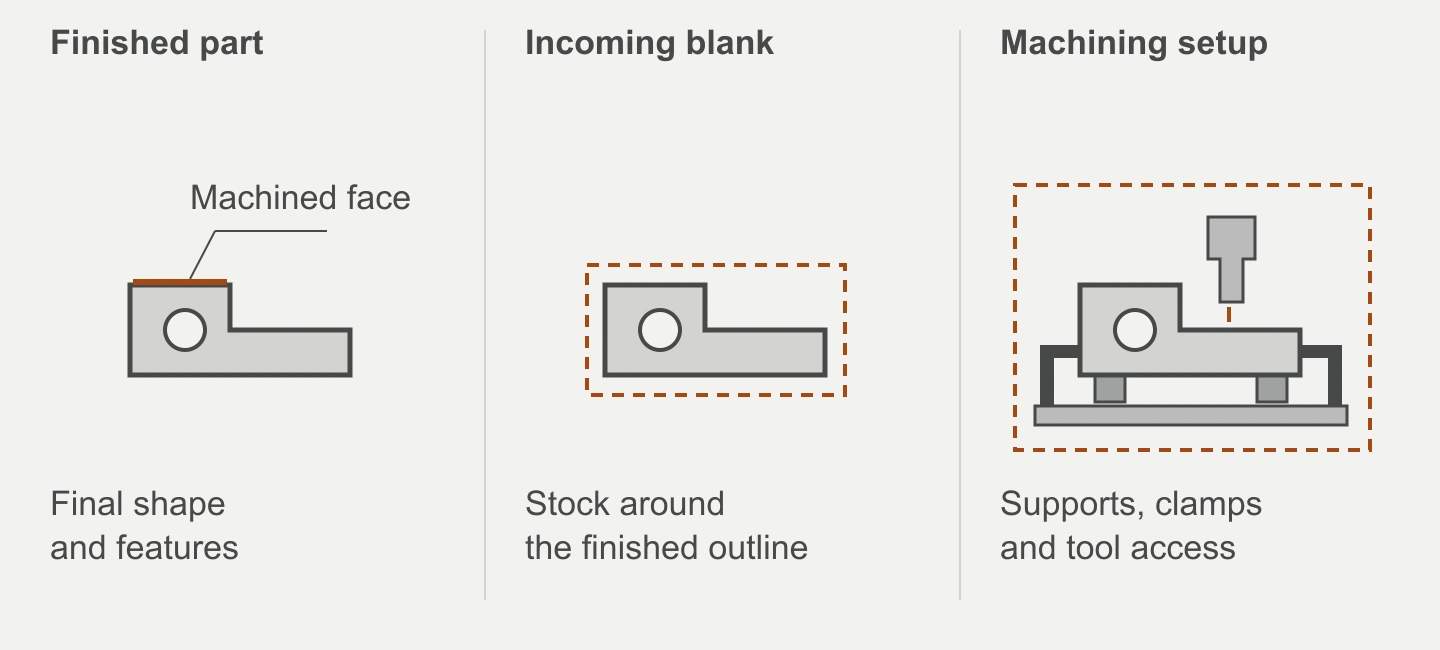
Final shape and features
Incoming blank
Stock around the finished outline
Machining setup
Supports, clamps and tool access
The solid part outline stays the same. Dashed lines distinguish the blank boundary from the larger setup boundary. Actual allowances and clearances depend on the part and machining plan.
Open diagram ↗- Finished part
- Send the drawing dimensions and the faces, bores or interfaces that need machining. An overall length alone does not show where the work is.
- Incoming blank
- Identify whether it is plate, a forging, a casting or a welded assembly. Include its dimensions and material condition; flag stock allowances that are still undecided.
- Machining setup
- Ask the workshop to check the proposed orientation, support and clamping positions, and access for the tool and holder. Include any restrictions on faces that may be contacted.
Stock position and orientation, fixture alignment and tool dimensions are separate inputs in NIST’s study of machining measurement. Our three-envelope checklist uses that distinction to organise an enquiry; it is not a clearance calculation. NIST AMS 400-1.
Mark what has to line up
Consider a welded equipment base with two mounting faces and a bored housing. A model may show all three features clearly, while leaving their acceptance requirements unclear. A buyer can make the enquiry much more useful with a short drawing markup.
| Drawing item | What to make explicit |
|---|---|
| Mounting faces | Identify the functional datum references and the required relationship between the faces. Point to the drawing callouts rather than adding a general “high precision” note. |
| Bored housing | Show the bore size, its permitted variation and its location relative to the specified datums. Include a section view if access is difficult to understand. |
| Opposite-side features | Highlight any features on the underside or reverse face. Ask how their relationship will be maintained and checked if the part is repositioned. |
| Faces left untouched | Mark surfaces that remain as supplied and those that must be protected from clamping marks. Distinguish these from machined surfaces. |
| Welded condition | State what has already been welded or treated before machining, and what operations remain afterwards. Include any applicable drawing requirements for that sequence. |
This is a drawing-review example, not a machining recipe. The design owner defines the functional requirements; the workshop reviews how to make and check them. If the drawing and model disagree, identify the controlling document and resolve the discrepancy before manufacture.
For assemblies needing both processes, the welding and fabrication page sets out the related supply scope.
Weight needs an orientation and a support plan
Give the mass of the incoming blank as well as the finished part, where known. A quoted finished weight leaves unanswered what the machine and handling arrangement will see before material is removed.
Include an overall view showing the intended orientation and any known lifting or support restrictions. If you have approved handling instructions, send them. Leave fixture selection, lifting arrangements and load checks to the responsible workshop personnel; a procurement checklist cannot establish a safe setup.
Tool access deserves its own question. Can the required face or bore be approached with the part secured in that position? If another setup is proposed, ask which features are made together and how the specified relationships are verified after repositioning. You do not need to prescribe the cutting sequence to ask for this explanation.
Agree how the critical features will be checked
“CMM inspection available” is a starting point. A coordinate measuring machine still needs a suitable measuring range, an accessible feature and an appropriate measurement method for the requirement. Equipment selection in NIST’s inspection-planning research is tied to design information and measurement requirements—not simply the name of the instrument. Read the research paper.
For the equipment-base example, ask for the report scope to identify the mounting-face relationships and bore requirements by drawing reference. Check that the proposal covers the required features and states when inspection takes place, particularly if later welding, treatment or assembly is part of the order.
- Which drawing revision, datum references and characteristic numbers will the report use?
- Which method is proposed for each critical requirement, and can it cover this part size and feature access?
- What inspection frequency, acceptance criteria and records are included in the quotation?
A workshop equipment list does not answer all three. See our quality and inspection information, then agree the part-specific report scope with the enquiry. We do not publish a single machining tolerance or measurement accuracy for every large part.
Use capacity figures to start a review
- Reference envelope
- 800 × 2,000 × 4,000 mm
- Weight reference
- 2 t
These manufacturer-confirmed figures are references for milling and gantry machining, rather than axis-travel specifications. Do not assume every maximum dimension and weight can be used together. Blank geometry, orientation, fixture space and the required operations still need checking.
Our large CNC machining capability page carries the fuller equipment and material information. When comparing quotations, ask each supplier to assess the same drawing package rather than comparing isolated maximum figures.
Send one coherent set of files
Use the same part number and revision across the drawing, model and enquiry. A short note explaining what is settled and what is still open is more useful than a folder of unlabelled alternatives.
- Geometry
- Controlled 2D drawing, 3D model if available, blank dimensions, finished dimensions and units.
- Material and condition
- Material grade, supply form, condition on arrival and any specified treatment before or after machining. State who supplies the blank.
- Acceptance
- Critical features and tolerances, datum references, surface requirements and the inspection records you need.
- Order scope
- Quantity, requested delivery date, delivery destination and whether the order covers machining only or additional work. A requested date is an input for review, not a confirmed lead time.
Keep the checklist with your drawing
Plain text you can copy into an email or fill in alongside your RFQ. Leave unknown items marked “to confirm”.
Download checklist (TXT)If you only have a sample or an early layout, send that and identify the missing information. We can discuss the intended scope first; a firm manufacturing specification needs the outstanding dimensions, material and acceptance requirements resolved.
Use custom manufacturing for an enquiry spanning several processes, or use the button below to send your large-part drawing. The checklist is optional—you do not have to fill in another form before contacting us.